Unable to set Max SOC
Posted: Fri Jun 19, 2026 12:22 pm
Hello all,
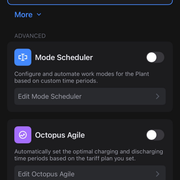
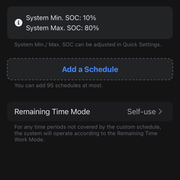
My installation just completed yesterday and just before my installers left for the day I set the Max SOC to 80% via the FoxCloud 2.0 app, just to see how quickly it took effect, which seemed to work fine.
After watching the battery charge and then start discharging overnight... I realised I should have just left this at 100%.
I've tried to set it back to 100% but keep getting an error and the value resets to 80% again:

I've also tried via the Fox ESS cloud v2 website but get the same error:
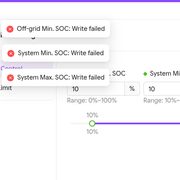
The API responds with error code 44098:
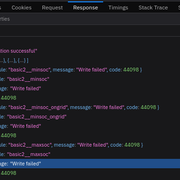
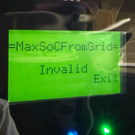
Additionally, setting the Max SOC via the inverter also shows "Invalid":
If it is of any use, my devices are as follows:
Inverter
Model: H1-5.0-E-G2-WL
Version_Master: 1.51
Version_Slave: 1.04
Version_ARM: 1.35
Battery
Model: EP12
Version_BMS: 1.012
I've also reached out to my installer for assistance but thought I'd try here too while awaiting their response.
Thanks in advance!
My installation just completed yesterday and just before my installers left for the day I set the Max SOC to 80% via the FoxCloud 2.0 app, just to see how quickly it took effect, which seemed to work fine.
After watching the battery charge and then start discharging overnight... I realised I should have just left this at 100%.
I've tried to set it back to 100% but keep getting an error and the value resets to 80% again:
I've also tried via the Fox ESS cloud v2 website but get the same error:
The API responds with error code 44098:
Additionally, setting the Max SOC via the inverter also shows "Invalid":
If it is of any use, my devices are as follows:
Inverter
Model: H1-5.0-E-G2-WL
Version_Master: 1.51
Version_Slave: 1.04
Version_ARM: 1.35
Battery
Model: EP12
Version_BMS: 1.012
I've also reached out to my installer for assistance but thought I'd try here too while awaiting their response.
Thanks in advance!